Make geospatial complexity legible.

Map Composer helps organizations turn maps, datasets, projects, and spatial assets into immersive Apple-native experiences for planning, communication, and decision-making. Build premium 3D territorial views, overlay the right data, attach the right media, and present the right story to the right audience without rebuilding everything from scratch.

Built for the full geospatial delivery cycle.

From authoring the package to presenting it in Vision Pro and guiding the room live, Map Composer keeps the same spatial story moving across the whole workflow.

Map Composer
Authoring

Map Composer authoring view over Paris in immersive map context
Paris overview 5 layers active Executive preset

Package draft

  • Place anchors and saved viewpoints
  • Audience presets and guided scenes
  • Media attachments and publish flow

macOS

Author spatial experiences without building a custom app

Build immersive map packages with places, layers, saved views, media attachments, and guided scenes in a visual authoring environment designed for fast iteration. One package can support multiple audiences and multiple moments in the same briefing.


visionOS

Present immersive maps in full 3D context

Open published map packages on Apple Vision Pro and explore portfolios, projects, territories, and infrastructure in a richer and more spatially legible way than traditional dashboards, screenshots, or flat presentations.

Presentation Controls
Optional companion
Audience view Preview of immersive map presentation state

Presets

Executive Planning Technical

Scene flow

  1. Territory overview
  2. Portfolio focus
  3. Project detail

Live toggles

Future projects
Media attachments
Technical detail

iPadOS

Guide sessions and control the story live

Use an iPad companion to switch presets, advance scenes, reveal overlays, and support live presentations, workshops, or stakeholder meetings with full control over what appears and when.

Territory that people can actually read.

When scale, terrain, visibility, network coverage, project phasing, and built context matter at once, flat dashboards force too much interpretation. Map Composer puts those relationships into an immersive format teams can review together.

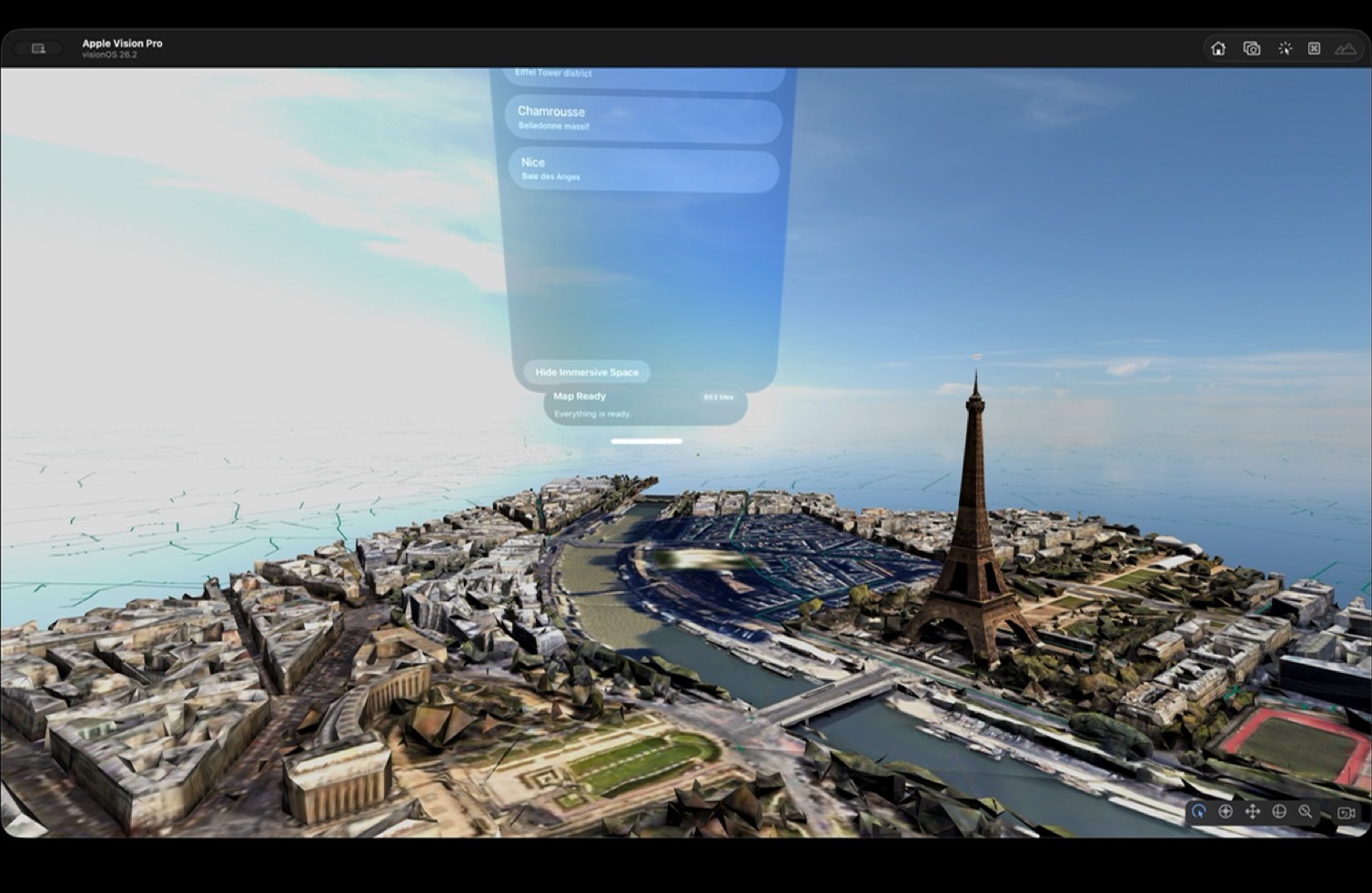
Immersive map scene showing territory, terrain, and project context

3D context changes the conversation. Distance, relief, adjacency, and placement become easier to perceive when people can stand inside the geography instead of decoding a stack of screenshots.

Audience Presets
Adaptive views
Current briefing Audience preset preview on a map presentation

Views

Executive Planning Public

Narrative order

  1. Overview
  2. Constraints
  3. Decision point

One package can support very different rooms. Executive, planning, technical, or public-facing views can reveal different layers, attachments, and scene order without rebuilding the underlying immersive experience.

What changes when decision-makers can stand inside the geography instead of decoding it from a stack of flat assets.

Faster

stakeholder alignment

Clearer

spatial storytelling

Less

custom development

More

reusable map experiences

Creation that stays reusable.

Most immersive map demos get rebuilt whenever the geography, stakeholder, or portfolio changes. Map Composer is designed to keep the underlying package reusable so teams can author once, adapt quickly, and publish new spatial stories without restarting a custom build cycle.

Built to scale

Reusable map briefings. Repeatable production.

Author once, adapt quickly, and publish new spatial stories without restarting a custom build cycle every time the geography, stakeholder view, or portfolio changes.

Package Builder
Compose
Map Composer workspace for assembling a territory package
Anchors Media Viewpoints

Scene system

  • Saved viewpoints and transitions
  • Layer stacks and visibility rules
  • Attachments mapped to the story

Compose places, layers, and viewpoints in context. Author the package visually, keep the geography legible, and build the briefing around the way people need to understand the territory, not around a generic slide template.

Immersive map package configured for different stakeholders

Reframe the same place for different audiences. Executive overviews, technical deep dives, public-facing explanations, or planning reviews can each get their own preset without multiplying production work behind the scenes.

Live Controls
Session

Reveal

Phasing Projects Coverage

Guide

  1. Open with the territory
  2. Focus the portfolio
  3. Land on the decision

Keep live sessions on track. Advance scenes, reveal overlays, and support guided presentations without losing control of what the room sees and in which order it appears.

Draft

Describe the briefing. Let the first pass take shape. Use AI to accelerate preset descriptions, scene drafts, legend ideas, and briefing structure so teams can move from spatial intent to a presentable package much faster.

Published immersive map package on Apple Vision Pro

Publish portable map packages. Keep the authored geography, overlays, viewpoints, and attachments together so the same spatial story can move cleanly from authoring on Mac to presentation on Apple Vision Pro.

Portable presentation system

Author once, then reframe the same territory for every audience.

Map Composer is built to keep the expensive part reusable: the package. Teams can adapt views, layers, attachments, and scene order without commissioning a new immersive prototype every time a planning question changes.

Single

1

package can support multiple stakeholder presets

Across

3

Apple surfaces in the same authoring and presentation loop

Built by experts. Designed for your teams.

Map Composer is created by Studio Meije and backed by the Studio·84 collective, combining immersive product design, spatial computing engineering, and enterprise delivery experience for Apple-native platforms.

Spatial products

We design immersive tools that turn maps, infrastructure, and territorial data into experiences people can actually understand together.

Enterprise delivery

We bring Apple-native engineering, deployment discipline, and partner execution for organizations working with sensitive spatial narratives and complex operating environments.

Secure by design. Deployable at scale.

Map Composer can be delivered in SaaS or self-hosted form, depending on the customer context. Organizations can keep spatial data, project overlays, customer portfolios, and sensitive infrastructure narratives inside their own operating and governance environment when required.

Deployment option

SaaS

  • Managed delivery by Studio Meije
  • Fastest route from package setup
  • Active briefings, workshops, and stakeholder reviews

Deployment option

Self-Hosted

  • Runs within your infrastructure
  • Full control over data and workflows
  • Supports sensitive spatial narratives and operating boundaries

It’s simple to add Apple Vision Pro to your existing infrastructure. Easily deploy, secure, and manage it at scale, while keeping immersive map workflows aligned with enterprise device management and governance requirements.

Zero-Touch Deployment

Automatically enroll shared or dedicated devices during setup so immersive map experiences can be rolled out without manual IT handling on every headset.

Device Management

Manage devices, apps, and return-to-service behavior using Apple’s existing frameworks, making repeatable demo, planning, and presentation environments easier to maintain.

Security

Apple Vision Pro is secure by design, with Apple silicon and the Secure Enclave protecting the system while managed app policies help keep sensitive spatial content inside approved destinations.

Identity

Integrate with enterprise identity flows so access to packages, layers, and customer-specific content remains aligned with existing authentication and authorization policies.

Integration

Fit immersive map workflows into existing networks, file providers, and governance controls, whether the experience is connected to hosted services or deployed inside a customer environment.

Immersive Studio

Map Composer sits inside a broader family of Apple-native apps designed to make immersive creation, communication, and deployment more repeatable across very different use cases.

Map Composer

Turn maps, datasets, and spatial assets into immersive briefings, planning tools, and stakeholder-ready experiences.

Training Composer

Author interactive training scenarios, step logic, and deployment-ready immersive learning flows for Apple Vision Pro.

Soon

Interior Composer

Showcase interior spaces, material options, and design intent in minutes with faster immersive presentation workflows.

Soon

Stage Composer

Build presentation-ready immersive experiences from reusable templates and adaptable spatial scene building blocks.

Bring your territory into immersive space

Start with a focused geography, portfolio, or planning story, then expand into reusable immersive map workflows across your organization.

Request a demo

Questions? Answers.

What is Map Composer?

Map Composer is a software suite designed to help organizations create, manage, and present immersive geospatial experiences on Apple Vision Pro.

It is built for turning maps, datasets, projects, and spatial assets into experiences that are easier to understand, present, and scale than a one-off immersive demo or a flat map interface.

Who is Map Composer for?

Map Composer is built for teams that need to explain territory, portfolios, infrastructure, planning scenarios, or spatial change in a way that decision-makers can immediately read.

  • Energy and utilities
  • Transport and mobility
  • Public institutions and planning teams
  • Infrastructure and real-estate portfolios
  • Tourism and territorial storytelling
Is Map Composer a GIS replacement?

No. Map Composer is designed to work alongside existing GIS and enterprise data workflows.

Its role is to turn selected data, assets, and views into immersive experiences that are easier to understand and present.

What kinds of content can be shown?

Map Composer can combine map layers, geospatial datasets, building and portfolio overlays, planned infrastructure, 3D assets, 360 immersive tours, media attachments, and guided scenes or tours inside the same experience.

It can also provide shortcuts into training scenarios authored with Training Composer when a map experience needs to hand off into a guided operational or learning workflow.

Can it show projects that do not exist yet?

Yes. Planned sites, future assets, and projected service areas can be represented using authored geometry, overlays, models, and explanatory attachments.

Can it support different audiences?

Yes. One of the core ideas is audience-aware presets so the same project can be presented differently to commercial teams, executives, technical stakeholders, or public audiences.

That also makes it a strong fit for booths, roadshows, and executive demo spaces where companies need to showcase territory, portfolios, and data in a more memorable way than a flat screen.

Does it support live data?

The platform is designed to support live feeds and operational overlays, depending on the customer context and integration scope.

That can include traffic, telemetry, incidents, or other stateful overlays when they are relevant to the experience being authored.

How do you handle sensitive data?

Hosted and self-hosted options can be adapted to the project context so organizations retain control over data, workflows, and deployment boundaries.

The goal is to align immersive map delivery with the customer’s governance and security requirements rather than force a disconnected operating model.

What platforms does Map Composer support?

Map Composer is designed specifically for the Apple ecosystem.

  • Mac for authoring and editing
  • Apple Vision Pro for immersive viewing and presentation
  • iPad for companion and control workflows in selected use cases
How do projects usually start?

Most projects begin with a focused geography, portfolio, or planning story.

  • Business and technical scoping
  • Review of available data, assets, and workflows
  • Prototype or proof of concept
  • Progressive rollout into reusable map packages and presentation flows