Upskill your workers, not your budget.

Real skill takes real practice. Until now, recreating the complexity of a real work environment meant choosing between quality and cost. With Training Composer for Apple Vision Pro, organizations now produce dense, interactive training scenarios without a bespoke development team and bring expertise to every learner, everywhere.

Built for the full training lifecycle.

From first scenario to scaled deployment, Training Composer covers creation, delivery, and live supervision without stitching together separate tools.

Training Composer authoring workspace

macOS

Create immersive modules without code

A visual editor lets you build your scene, interactions and step logic. Describe what you want, and the experience takes shape. Projects can be previewed instantly on Mac or in Vision, and synced to the cloud and your Vision fleet in seconds.
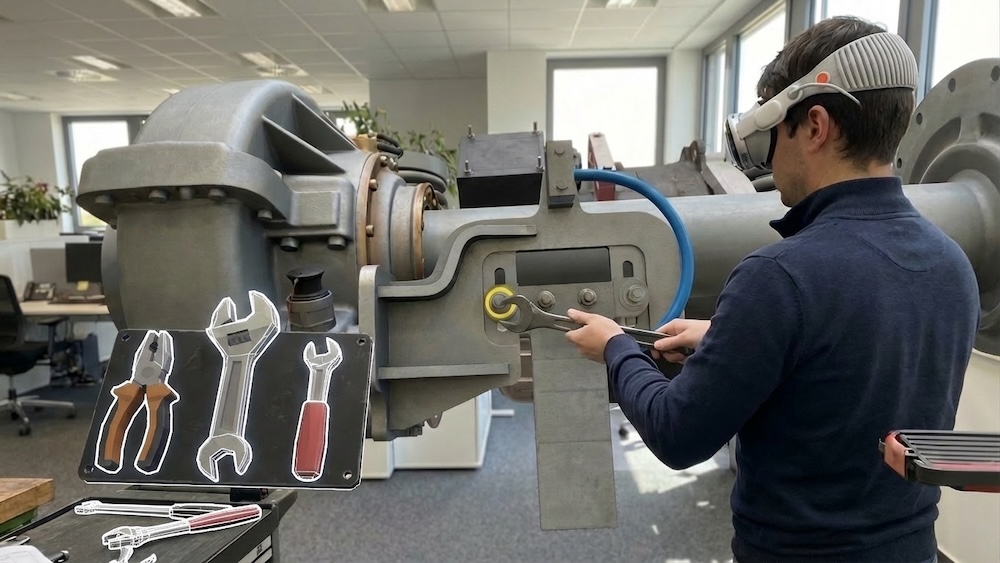
Training Viewer session on Apple Vision Pro

visionOS

Deliver true-to-life immersive practice

Once inside Apple Vision Pro, learners follow step-by-step guided scenarios and can progress independently or side by side. With SharePlay and Spatial Personas, some instructors or peers can be present remotely, as if everyone were in the same space.

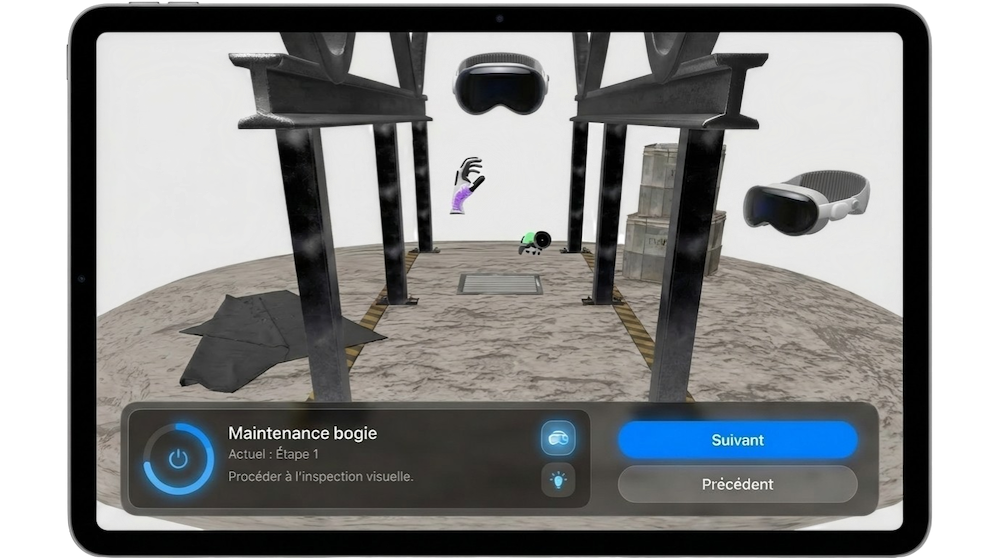
Training Companion control center on iPad

iPadOS

Coach live sessions with full context

While learners are inside Apple Vision Pro, instructors stay fully present on iPad. They follow each learner's current step, intervene in real time, and move sessions forward without interrupting the immersive experience.

Practice that feels like the real thing.

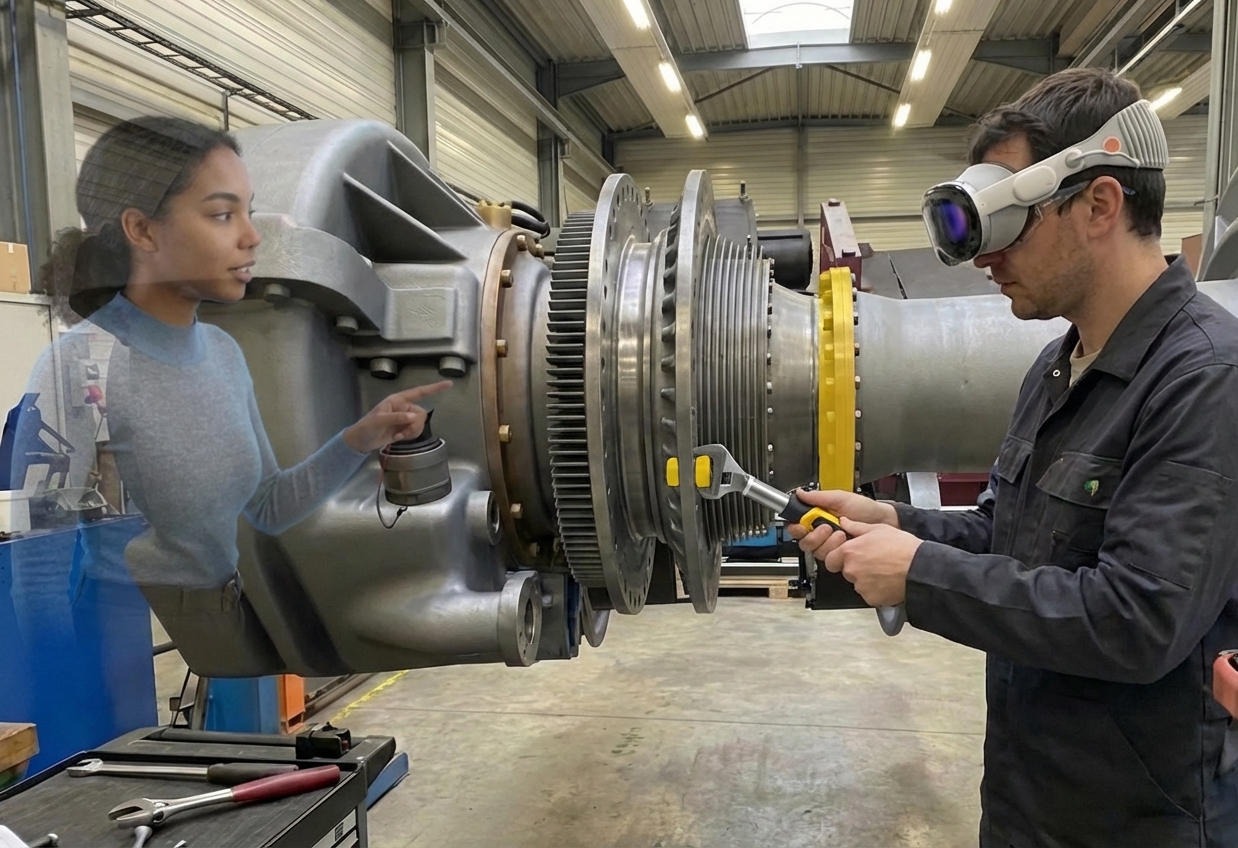
Real skill doesn't always come from a slide deck, a printed PDF or a safety video. It comes from being present in the environment, making the right call under pressure, and repeating it until it's muscle memory. Now you can put learners inside the situation, spatially, procedurally, and cognitively, before they ever set foot on the floor.

Immersive real-time 3D training visual

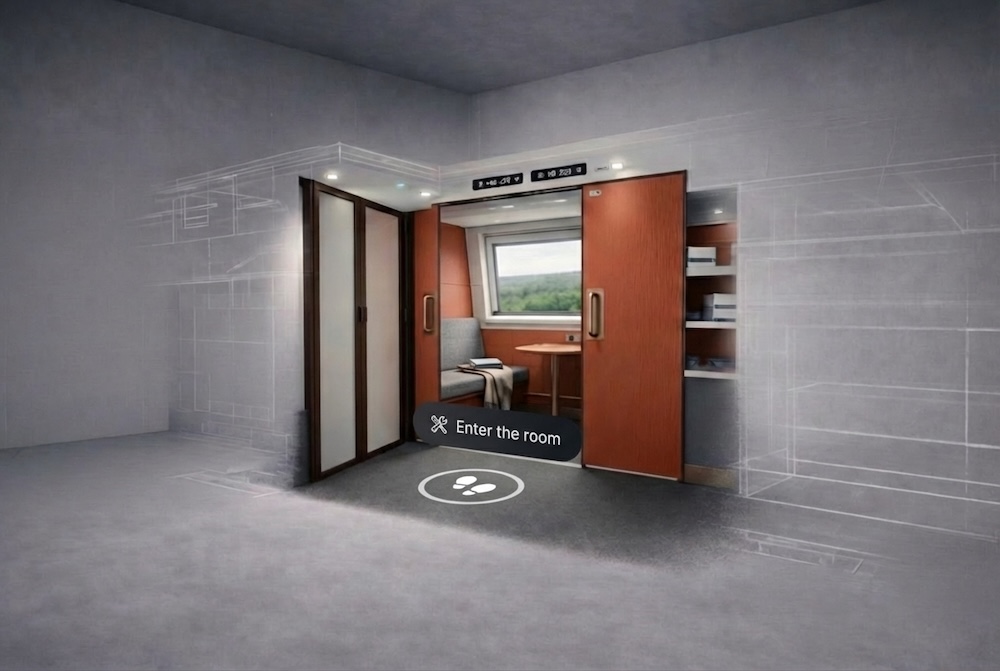
Forget passive and linear videos. The scenarios are real-time 3D, so they're collaborative, interactive, spatially accurate, procedurally faithful.

Immersive training scenario built from real procedures and equipment

Scenarios are built from your actual equipment, environments, and procedures. The confidence learners build inside Apple Vision transfers directly to the floor. The first time isn't the first time anymore.

Observed learning outcomes from immersive electrical training on Apple Vision.

Performance

73%

faster on key tasks

Retention

3x

better retention, with up to 90% observed

Critical errors

0%

on two observed error types

Readiness

93%

field-ready to apply skills on the job

Based on a Deloitte electrical training studio on Apple Vision Pro: 17 learners, 12-week program, 3 XR modules.

Creation that stays in your hands.

Most immersive training pipelines leave you dependent on studios, developers, or agency-owned production chains. With Training Composer, your organization can author, iterate, and deploy as quickly as the work itself.

Built to scale

Ambitious training. Predictable costs.

Create new scenarios, update existing ones, and deploy on your schedule. Keep immersive training aligned with changing procedures without restarting a custom development cycle every time something evolves.

Training Composer visual editor for building scenarios

Build complete training scenarios in a visual editor. Arrange steps, set conditions, and adjust flows without touching code or waiting for a build cycle.

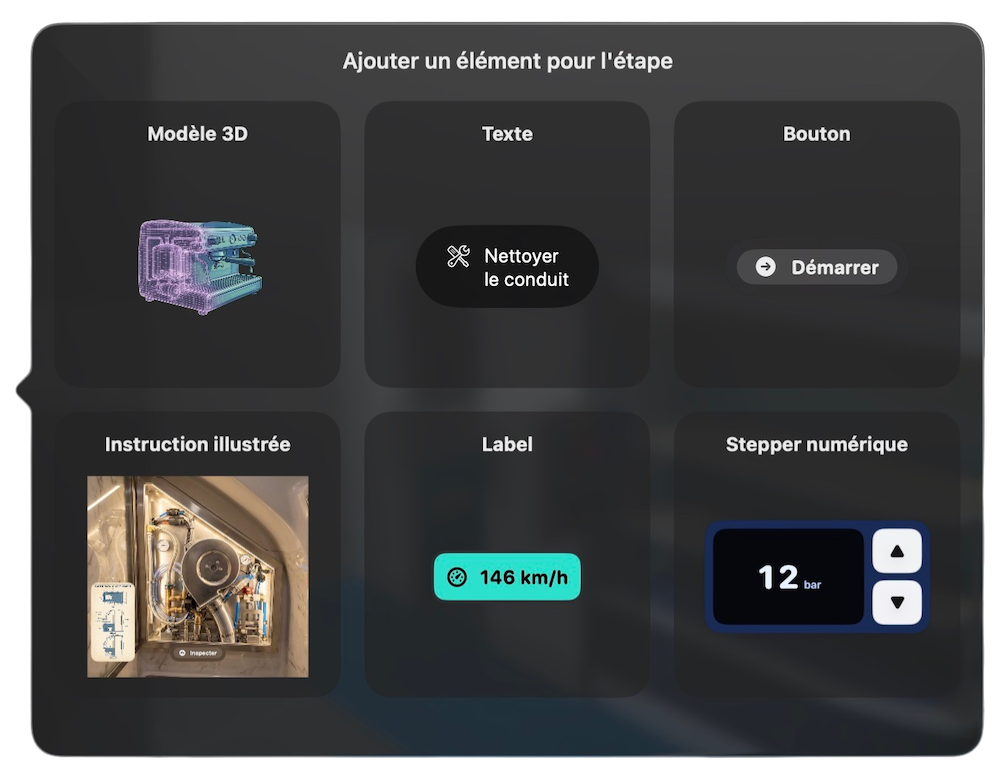
Training step components and nodes ready to place

All the assets you need, ready to place. Add 3D models, instructional text, action buttons, illustrated cards, and more, directly into each step. Everything snaps into place.

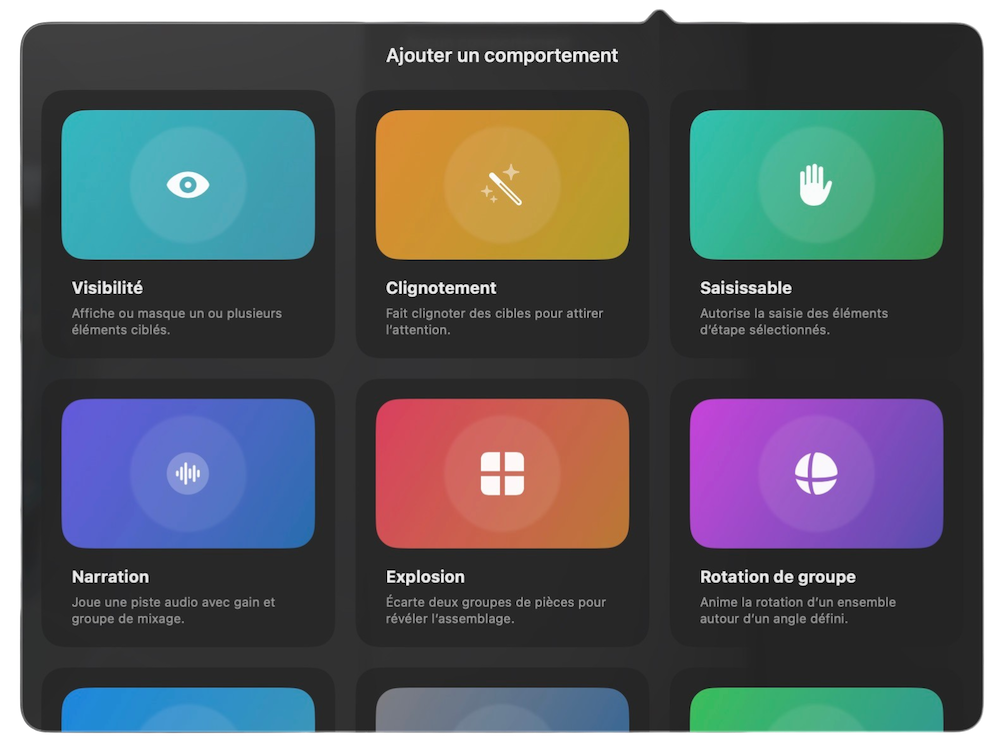
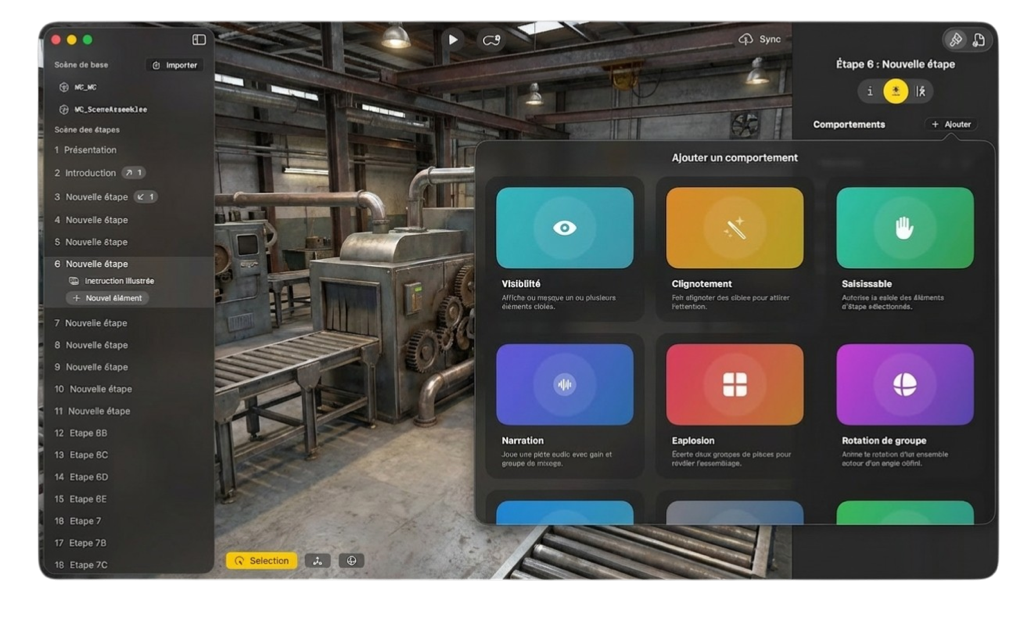
Training scene behaviors configured for interactive responses

Attach behaviors to elements in the scene. Show or hide parts, trigger animations, explode or rotate assemblies, emit particles, play narration, and more. Combine those building blocks and scenarios respond to every learner action.

Draft

Focus on the what, not the how. Sometimes, describing your training in natural language is faster than dozens of clicks. Just describe the steps, the guidance, and the interactions, and the experience takes shape around what you want to teach.

Training scenario previewed on Apple Vision Pro before shipping

See it on the headset before it ships. What you see is exactly what learners will experience. No build step, no guesswork.

Training programs managed from a single project picker hub

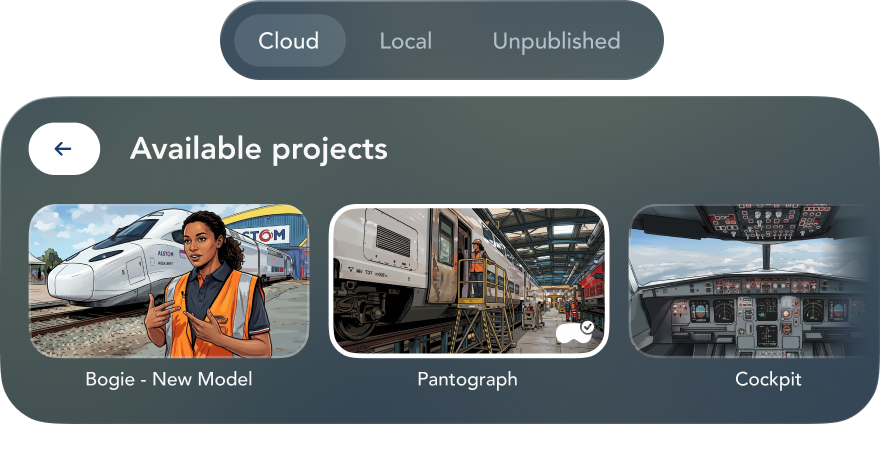
All your programs, always under control. Manage your local and cloud projects, deploy new versions to your fleet in seconds.

Captured real-world environment prepared for import into Training Composer Soon

Capture real environments. Import them directly. Upcoming support for Gaussian Splat capture pipelines will make it faster to bring real-world environments into Training Composer, without manual 3D reconstruction.

Logitech Muse support for Apple Vision Pro Soon

Precision gestures with Logitech Muse. Enable precision-driven manipulations and natural rotational gestures that mirror actions such as tightening a screw with a screwdriver, in a way that feels much closer to the real task.

Repeatable production

An immersive training program your team can own.

Asking developers to fine-tune training details isn't a good use of their skills or your budget. Training Composer is built to reduce the cost and lead time of creating, updating, and rolling out immersive programs.

Up to

50×

faster than regular development

Less than

1 day

per training scenario

Built by experts. Designed for your teams.

Studio Meije is a founding member of the Studio 84 collective, a group of specialists in immersive production and enterprise-grade Apple experiences. We built the software platform. Our partners will produce your immersive videos and 3D environments.

Final Cut Pro icon

Immersive Video

We produce hyper-realistic immersive films that bring extraordinary emotions to life.

Reality Composer Pro icon

RealityKit Environments

We blend artistry and real-time technology to create 3D worlds that feel alive around you.

Secure by design. Deployable at scale.

Training Composer is available as SaaS or self-hosted, if you wish to keep your data, workflows, and assets entirely within your own infrastructure.

Early access

SaaS

  • Managed deployment
  • Scenarios hosted on our servers
  • Standard pricing
Get early access

Custom license

Self-Hosted

  • Runs within your infrastructure
  • Full control over data
  • Custom pricing
Book a demo

It’s simple to add Apple Vision Pro to your existing infrastructure. Easily deploy, secure, and manage it at scale, just like your other Apple devices.

Zero-Touch Deployment

Automatically enroll Apple Vision Pro in device management during initial setup, without IT having to physically touch it.

Device Management

Apple’s built-in frameworks enable IT to configure and monitor devices and deploy apps. With Return to Service, devices can be configured to automatically return to a known state, making shared-use environments easy to manage.

Security

Apple Vision Pro is secure by design, with Apple silicon and the Secure Enclave to protect the system. And Optic ID creates biometric authentication using the unique patterns of an employee’s iris.

Identity

Built-in frameworks for identity integration make signing in to corporate services simple and secure. Users access corporate data with Optic ID, and IT can use management controls to ensure that data stays within managed destinations.

Integration

Apple Vision Pro fits easily into your existing management infrastructure for iPhone and iPad. Access secure Wi-Fi and VPN networks and integrate with file providers in the Files app.

Immersive Studio

Training Composer is part of a suite of Apple-native tools built for every immersive workflow, from interactive training to spatial data, interior showcases, and presentation experiences.

Training Composer

Create and deploy interactive training scenarios for Apple Vision Pro.

Map Composer

Turn maps, datasets, and spatial assets into immersive briefings, planning tools, and stakeholder-ready experiences.

Soon

Interior Composer

Showcase interior spaces, material options, and design intent in minutes with faster immersive presentation workflows.

Soon

Stage Composer

Build presentation-ready immersive experiences from reusable templates and adaptable spatial scene building blocks.

Start your immersive training program

Feel free to reach out — we'll help you scope and launch your first program.

Questions? Answers.

What is Training Composer?

Training Composer is a software suite designed to help companies create, manage, and scale immersive professional training on Apple Vision Pro.

It is built for organizations that need to train teams on procedures, equipment, environments, or technical tasks in a faster, more cost-effective, and more maintainable way than traditional custom development.

Who is Training Composer for?

Training Composer is built for companies that need to train employees on complex or operational subjects, especially when training is expensive to produce, difficult to update, or dependent on rare equipment, expert knowledge, or high-stakes procedures.

  • Manufacturing and industry
  • Transport and field operations
  • Energy and maintenance
  • Healthcare and professional education
What kinds of training can be created with Training Composer?

Training Composer supports technical procedures, maintenance workflows, safety training, operational onboarding, equipment handling, step-by-step task guidance, and knowledge transfer for complex environments.

It is especially useful when people need to understand, repeat, and retain real-world actions rather than simply read or watch content.

How is Training Composer different from a traditional custom project?

Traditional immersive training projects often become slow and expensive as soon as you need to create many modules or update them regularly.

Training Composer provides a software foundation that makes training creation more repeatable and scalable, so teams can evolve content much faster instead of rebuilding each module from scratch.

Do we need a technical team to use it?

No. Training Composer is designed so non-technical users can contribute to training creation and updates, especially when they already understand the operational content and learning objectives.

Technical support can still help for advanced workflows, integrations, or asset preparation, but the platform is designed to reduce dependency on specialist development teams.

Do we need existing 3D assets to get started?

Not always, but existing assets can significantly accelerate a project. Training Composer can work with existing models, prepared assets, or a mix of available content and newly produced material.

If your assets are too heavy, incomplete, or not ready for real-time use, the project can start with an asset review and a plan for optimization and reuse.

What platforms does Training Composer support?

Training Composer is designed specifically for the Apple ecosystem.

  • Mac for creation and editing
  • Apple Vision Pro for immersive training
  • iPad for companion, supervision, or instructor workflows in selected use cases
Can training be viewed without Apple Vision Pro?

Some support and supervision workflows can involve iPad, but for highly immersive and gesture-based training, Apple Vision Pro remains the main device.

The right setup depends on the nature of the training, the learning objective, and the ergonomics of the use case.

Does Training Composer use AI?

Yes. Training Composer uses AI to accelerate parts of the content creation and editing workflow.

There is no forced single provider. Each company can choose the model that best fits its needs based on performance, security, cost, and internal policy. Depending on the client requirements, AI can run through a hosted setup or within the company's own environment.

How do you handle data security and confidentiality?

Security and confidentiality are core considerations, especially for industrial and enterprise use cases.

Depending on the project, Training Composer can be designed to fit the client's technical environment and governance requirements so companies retain control over their data, content, and sensitive workflows.

Can Training Composer integrate with our existing systems and workflows?

Yes, depending on your environment and project scope. A key part of the approach is understanding your existing assets, internal processes, content pipelines, and technical constraints.

The goal is not to force a disconnected tool into your organization, but to align Training Composer with the way your teams already work.

How do projects usually start?

Most projects begin with a focused use case and a clear objective.

  • Business and technical scoping
  • Review of assets and existing workflows
  • Prototype or proof of concept
  • Deployment and progressive expansion
Do you offer a proof of concept?

Yes. A proof of concept is often the best way to validate the relevance of the use case, confirm technical feasibility, assess asset compatibility, and estimate business value.

It also helps align innovation, training, IT, and operational stakeholders early in the process.

How is Training Composer priced?

Pricing depends on the project scope, level of customization, asset complexity, number of modules, and the integration or support required.

Depending on the context, the commercial model can include software access, setup, integration, content work, and project support.

Can our teams become autonomous over time?

Yes. One of the main goals of Training Composer is to reduce long-term dependency on fully external production for every content change.

The level of autonomy depends on your internal teams, governance, and operating model, but the platform is meant to help organizations build internal capability over time.

Is Training Composer right for our company?

Training Composer is a strong fit when training is expensive to produce or update, procedures are complex and evolving, real equipment is costly to mobilize, errors have operational or safety consequences, or you need more consistent and scalable knowledge transfer.

If that sounds like your context, Training Composer is likely worth exploring.